



Pre-Built A2P Campaign Widget-First Registration flow
If you’ve ever struggled with A2P 10DLC registration, you know how confusing and rejection-prone the process can be. One small
Contents
- What Is Voice Dictation in AI Builder
- Why A2P Registration Needed a Better Solution
- What Is the Widget-First Registration Experience
- Streamlined Messaging Use Case Selection
- Protection Against High-Risk Campaigns
- Automatic Age-Gating Compliance
- Auto-Generated Compliance Chat Widget
- What Users Cannot Change
- Final Widget Structure
- Read-Only Preview and Final Review
- Who Benefits Most from This Update
- Conclusion
If you’ve ever struggled with A2P 10DLC registration, you know how confusing and rejection-prone the process can be. One small mistake in consent language, opt-in proof, or campaign classification can delay approval for weeks.
That’s exactly why the Pre-Built A2P Campaign (Widget-First) Registration Experience was created. It removes guesswork, automates compliance, and guides you through a safer path to approval — all while dramatically reducing carrier rejection risk.
Instead of writing legal-style disclosures or building opt-in systems from scratch, the platform now generates a fully compliant chat widget and locks critical elements to ensure everything meets carrier standards.
What Is Voice Dictation in AI Builder
- Pre-built campaigns use a compliant chat widget as the only opt-in method
- Consent language and disclosures are generated automatically
- Risky combinations like financial marketing are blocked
- Age-gating requirements are enforced automatically when needed
- Required compliance fields cannot be edited or removed
- Approval chances improve due to carrier-aligned structure
Why A2P Registration Needed a Better Solution
A2P 10DLC rules exist to reduce spam and protect consumers, but they also place a heavy burden on legitimate businesses. Companies must prove:
- How customers opt in
- What messages will be sent
- Who is sending them
- How users can opt out
That disclosures are clear and visible
Manual submissions often fail because businesses unintentionally miss one of these requirements. The widget-first approach flips the process by building compliance directly into the registration flow.
What Is the Widget-First Registration Experience
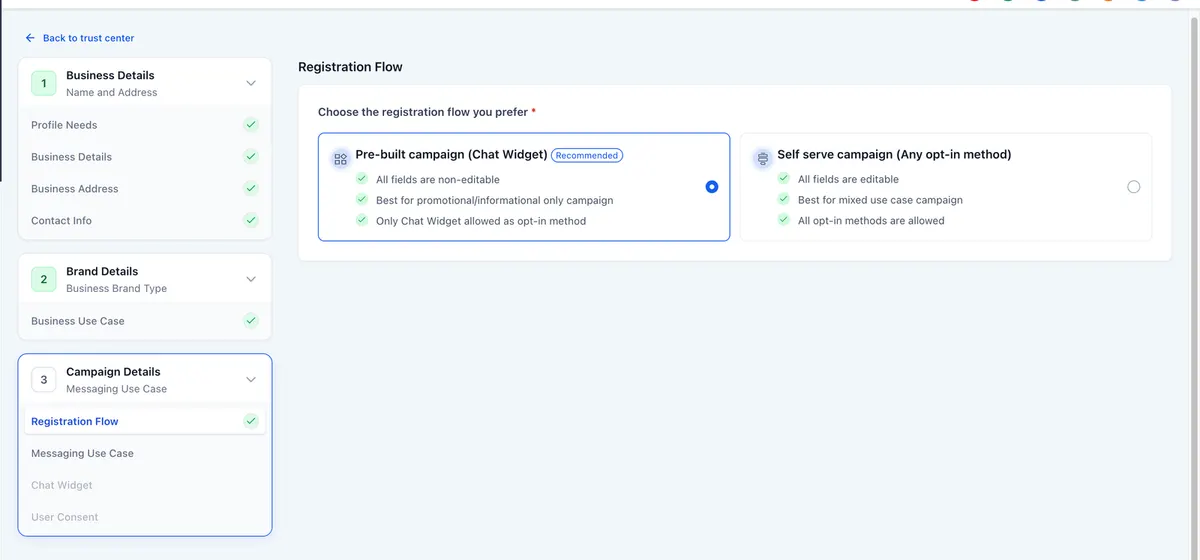
The pre-built A2P campaign option appears during standard registration and guides users through a controlled setup using a compliant chat widget.
Unlike traditional flows that allow custom opt-in methods, this path enforces a single, carrier-approved approach.
What makes it different
- Compliance is automated rather than written manually
- Opt-in proof is built in from the start
- Risky configurations are prevented before submission
- Required disclosures cannot be altered
Think of it as “compliance by design.”
Streamlined Messaging Use Case Selection
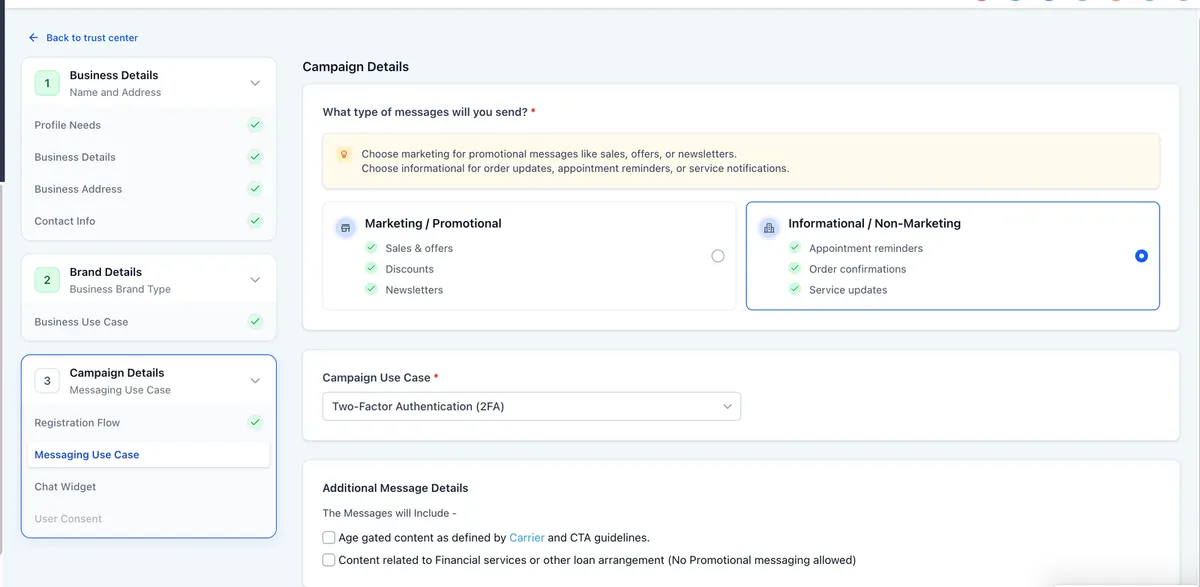
Choosing the correct message type is one of the biggest causes of rejection. The new flow simplifies this decision into two clear steps.
Step one: Select message type
You must choose one category:
- Marketing or promotional messages
- Informational or non-marketing messages
Step two: Select approved use case
If marketing is selected, only the marketing option appears.
If informational is selected, you can choose from carrier-approved categories such as:
- Two-factor authentication
- Account notifications
- Customer care
- Delivery updates
- Fraud alerts
- Public service announcements
- Security alerts
- Polling and voting
- Higher education messages
This filtering prevents mismatched classifications that commonly trigger rejection.
Protection Against High-Risk Campaigns
Certain industries — especially financial services — face stricter scrutiny from carriers.
The system now blocks combinations known to cause rejection.
Example protection rule
If you select:
Marketing messages + financial services or loan offers
You cannot proceed until you switch to informational messaging.
This safeguard prevents submitting campaigns that carriers typically flag as high risk.
Automatic Age-Gating Compliance
Some content requires proof that recipients are adults. Instead of leaving this to the user, the system handles it automatically.
When age gating is triggered
- Age-restricted content
- Financial or lending services
What happens next
- A mandatory date of birth field appears in the widget
- The field cannot be removed
- Users must complete it before submission
If age gating is not required, the field does not appear.
Auto-Generated Compliance Chat Widget
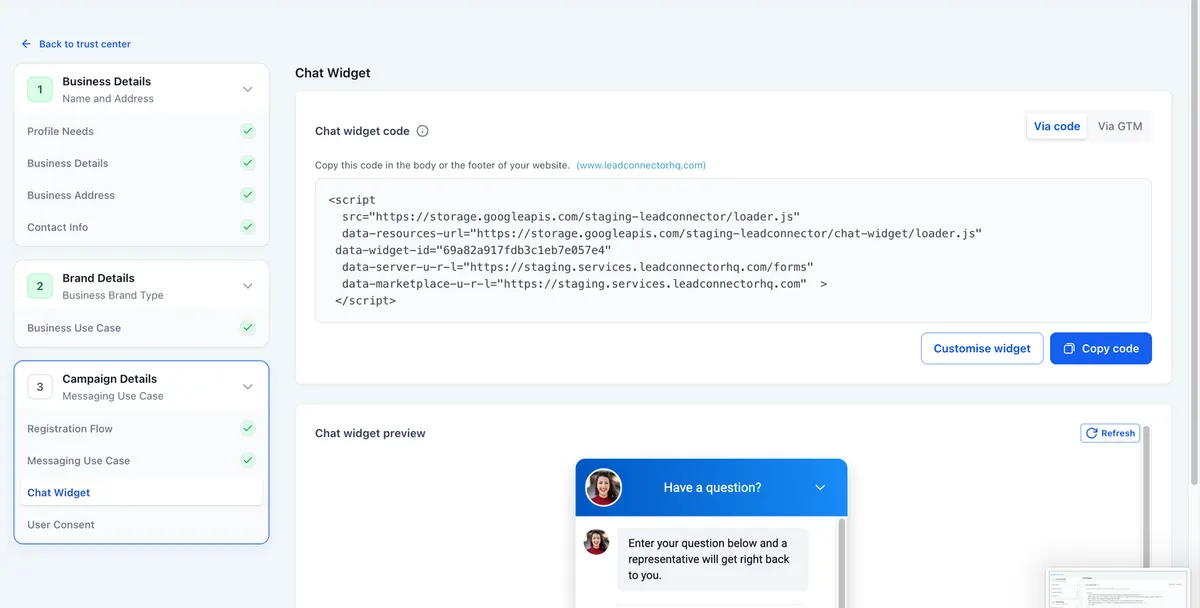
The centerpiece of the new experience is a fully compliant chat widget created automatically.
This widget serves as both the opt-in mechanism and proof of consent.
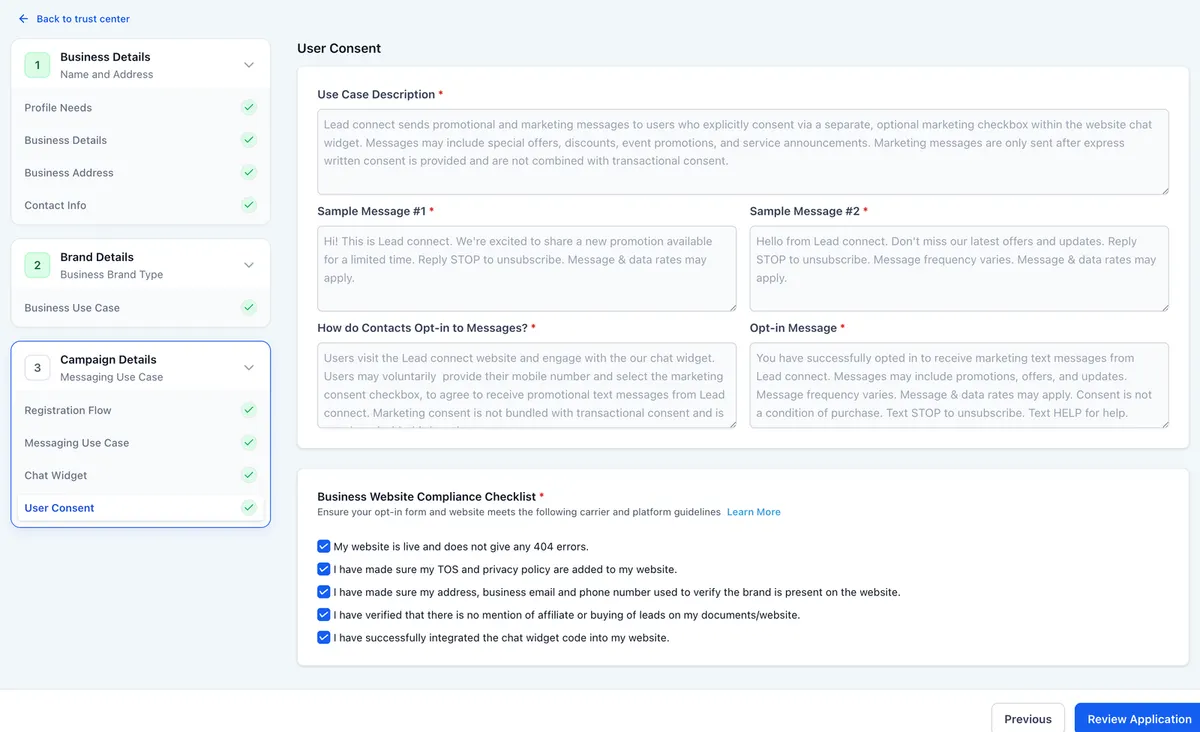
What the system adds automatically
- Business name inserted into disclosures
- Standard consent language
- STOP and HELP instructions
- Message frequency disclosure
- Data rate notice
- Campaign attachment
- Embeddable code for your site
Because everything is standardized, carriers can easily verify compliance.
What Users Cannot Change
To prevent accidental violations, critical compliance elements are locked.
Users cannot:
- Edit disclosure wording
- Remove required fields
- Add custom consent checkboxes
- Use alternative opt-in methods
- Modify compliance text
Only non-compliance elements like colors or header text can be customized.
Final Widget Structure
Required fields
- Phone number
- Disclosure block
- STOP and HELP instructions
- Data rate statement
- Message frequency information
Conditional fields
Date of birth when age gating applies
Optional fields
- Name
- Message text
- Visual styling
Removed elements
- Email field
- Editable compliance text
- Custom consent checkboxes
- Opt-in method selector
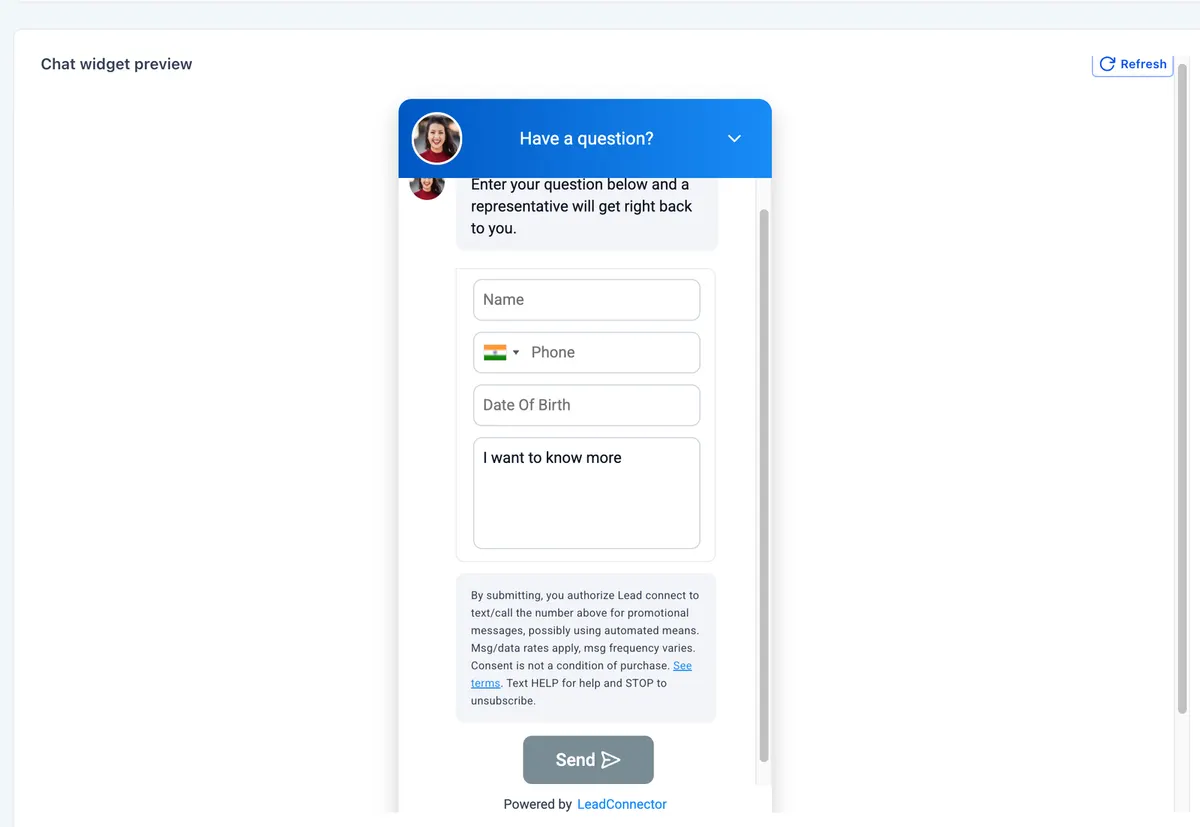
Read-Only Preview and Final Review
Before submission, users can preview the complete widget exactly as carriers will see it.
The preview shows:
- Disclosure placement
- Required fields
- Age verification field if applicable
A final confirmation screen displays all campaign details in a locked format, including sample messages and compliance confirmations.
Who Benefits Most from This Update
This registration experience is especially helpful for:
- Agencies onboarding new clients
- Businesses launching SMS marketing campaigns
- Companies sending informational alerts
- Organizations in regulated industries
However, it is not available for mixed-use campaigns or sole proprietor registrations.
Conclusion
The Pre-Built A2P Campaign Widget-First Registration Experience represents a major shift from complicated manual submissions to automated, compliance-first setup.
By generating a carrier-approved opt-in system, preventing risky configurations, and locking critical disclosures, it helps businesses move from confusion to confidence and from rejection to approval.
If you plan to launch SMS campaigns, this approach is one of the safest and fastest ways to get started while staying fully aligned with modern messaging regulations
Quick answers
Frequently asked questions
What is A2P 10DLC?
It is a U.S. messaging framework that regulates business text messaging to reduce spam and improve deliverability.
Why do campaigns get rejected?
Common reasons include incorrect consent language, unclear opt-in methods, missing disclosures, or mismatched use cases.
Can I customize the widget text?
Only visual elements can be changed. Compliance language is locked to meet carrier requirements.
Can sole proprietors use this flow?
No. It is not available for sole-prop or mixed-use campaigns.
Where this leaves you
Skip the build. Import a working GoHighLevel account instead.
Everything above is buildable by hand, and most people never finish. A snapshot is the same setup already made: funnels, pipelines, calendars, the prebuilt website and the automations, written for one industry and wired together before it reaches you.
- Delivered within 24 hours by email
- Install on unlimited sub-accounts you manage
- 20 hours of setup help across 15 days
Keep reading
All articles
Voice Dictation in AI Builder & Assistant
Build Powerful Workflows Just by Speaking Imagine building a complete automation without typing a single word. No clicking through triggers.
February 27, 20264 min read
Conversation AI Auto Follow-Up
The Smart Way to Re-Engage Leads Without Manual Work Leads don’t always ghost you on purpose. Sometimes they get busy.
February 20, 20264 min read
Manus Triggers and Actions in Workflows
AI automation is evolving fast. If you’ve ever wished you could fully control AI tasks inside your CRM without relying
February 18, 20265 min read